
Best Action Camera for Surfing: 10 Cameras That Survive the Whip, the Wipeout, and the Salt
From pro-grade 4K stabilizers to wallet-friendly workhorses, here is how to pick the camera that actually keeps up with you in the lineup.
There is a particular kind of heartbreak that only surfers know. You paddle out at dawn, the swell is glassy, you pull into the best wave of your month, and later you scroll through your footage to find a blurry thumb, a fogged lens, or a battery that died ten minutes into the session. The camera you chose mattered more than you thought it would.
Surfing is one of the hardest environments you can throw at a piece of electronics. There is saltwater, constant motion, sudden impacts, glare off the water, and a camera that spends half its time being dunked and the other half being baked in the sun. A camera that looks fantastic on a spec sheet can fall apart after three sessions if it was never built for this kind of abuse.
This guide covers ten action cameras that surfers actually use, from flagship models with big sensors and silky stabilization to budget options that make filming accessible to everyone. We break down what each one does well, where it struggles, and who it is best suited for. If you are still putting your kit together, our guide on what you need for surfing is a handy companion to this one.

1. What Makes a Great Action Camera for Surfing?
Before comparing models, it helps to understand what surfing actually demands from a camera. A great everyday action camera is not automatically a great surf camera. The ocean exposes weaknesses that a hiking or biking trip never will, so the criteria for a good surf camera are a little different from the general-purpose list.
It has to be genuinely waterproof, not just splash resistant
Surf cameras get submerged constantly, and not gently. When you duck dive a big set wave or get held down after a wipeout, the camera experiences real pressure and turbulence. Most modern flagship action cameras are rated waterproof to depths well beyond what you will ever surf in, but the rating only holds if the seals are clean, the doors are properly latched, and the lens cover is in good shape. A camera that is waterproof on paper but fussy about its door latch can flood at the worst possible moment.
Stabilization is the difference between watchable and nauseating
A board is a moving platform on a moving surface. Without good electronic stabilization, footage from a nose or deck mount looks like a washing machine. The best stabilization systems today crop slightly into the frame and use gyroscope data to smooth out vibration and chop, producing footage that looks almost gimbal-mounted even when strapped to a bouncing board. For surfing, you want stabilization that stays effective at high frame rates and in horizon-leveling modes, because the horizon is constantly tilting as you turn.
Low-light and glare performance matter more than you think
Dawn patrol and golden-hour sessions are when the ocean looks best, and they are also when small sensors struggle most. Bigger sensors and better image processing hold detail in shadows while keeping bright skies from blowing out. Glare is another quiet problem: sunlight bouncing off wet lens covers and the water itself can wash out footage, which is why lens quality and coatings matter as much as raw resolution.
Battery life has to outlast your session
Cold water drains lithium batteries faster than warm air does, and a camera that is recording continuously will burn through its charge quickly. A realistic session might last ninety minutes to two hours. If a camera cannot get through that on a single battery in cold conditions, you will be stuck swapping batteries on the beach, and that gets old quickly. Cameras with removable batteries and fast charging are especially convenient for surfers who stay out all morning.
Simple controls you can use with cold, wet hands
Touchscreens are famously unreliable when wet, and you will rarely be fiddling with menus mid-session anyway. The best surf cameras have physical record buttons, quick-start modes, and voice or app control so you can start and stop recording with minimal fuss. Gloves and cold fingers make this even more important in winter. If you surf cold water, pairing your camera with the right gear like a cold water wetsuit will keep you out there long enough to actually use it.
A mounting ecosystem that suits the water
The camera is only half of the setup. How you attach it determines what angles you can capture, whether it survives a wipeout, and whether it floats if it comes loose. Strong accessory ecosystems from the major brands make it easy to find board mounts, chest mounts, pole grips, and floating handles. We cover these in more detail later in the guide, because a great camera on a bad mount is still a lost camera.
Quick takeaway: For surfing, prioritize stabilization, battery life, and secure mounting over headline resolution. A well-stabilized 4K clip beats a shaky 5K clip every single time.
Thinking about the conditions you surf in
The ideal camera for a glassy tropical point break is not necessarily the ideal camera for a cold, gray beach break. In warm, bright locations, almost any modern camera produces lovely footage, and your priorities may lean toward weight, price, and convenience. In cold or overcast regions, low-light performance and battery endurance rise to the top of the list, because the light is flatter and the cold bites into your battery.
Wave size matters too. Small, gentle surf is forgiving, and a budget camera on a simple mount will usually survive without drama. Heavy, punchy waves with strong currents and powerful wipeouts are a different story. In that environment, a premium camera with a secure mount, a floating handle, and a tether is the safer choice, since the cost of losing a cheap camera is lower but the cost of losing footage of a once-in-a-season day is not.
Why footage review improves your surfing
Beyond the fun of sharing clips, a camera is one of the most effective coaching tools you can own. Watching yourself surf reveals things that you simply cannot feel in the moment: a stance that is too upright, a head that drops before a turn, or a late takeoff that costs you a wave. Many surfers are surprised by how different their surfing looks from how it feels. Even a few minutes of footage after each session can accelerate your progress, and if you wonder whether the effort is worth it, our article on whether surfing is hard explains why feedback makes such a difference.
See what is currently available and compare options side by side.
2. Key Specs Explained: What Actually Matters in the Lineup
Action camera marketing is crowded with numbers, and not all of them deserve your attention. Here is a plain-language breakdown of the specs that genuinely affect your surf footage, along with the ones you can mostly ignore.
Sensor size
The sensor is the part of the camera that captures light. A larger sensor gathers more light, which translates into cleaner footage in dim conditions, better dynamic range, and more flexibility when editing. The newer DJI cameras in this guide use larger sensors than most traditional action cameras, and that advantage shows up clearly at sunrise, at sunset, and under overcast skies. Smaller sensors can still look great in bright midday sun, but they get noisy quickly when the light fades.
Resolution and frame rate
Most surfers will be perfectly happy with 4K footage. Higher resolutions like 5K give you more room to crop in editing, but they produce enormous files and drain batteries faster. Frame rate is arguably more important for surfing. Shooting at 60 or 120 frames per second lets you slow your footage down in editing, which turns a good turn or a barrel into something cinematic. If you plan to share clips on social media, 4K at 60 frames per second is the sweet spot for most people.
Electronic image stabilization
Every camera in this guide offers some form of electronic stabilization, but the quality varies enormously. Premium systems from the leading brands handle high-frequency vibration, large sudden motions, and horizon tilting very well. Budget systems work fine for moderate motion but can wobble or warp on a vibrating board. Stabilization modes often crop the image, so check how much field of view you give up when you turn them on.
Waterproof rating
Ratings are expressed as a depth in meters or feet. The key thing to understand is that for surfing, the depth number is less important than the build quality behind it. Some budget cameras are not natively waterproof and rely on a bundled housing, which is another seal that can fail. Always rinse your gear in fresh water after sessions and inspect seals before every outing.
Battery capacity and swappability
Look for cameras with removable batteries, good cold-weather performance, and the option to buy spares. Surf sessions can run long, and swapping a fresh battery between sessions is much more convenient than waiting for a recharge. Some of the budget cameras here include two batteries in the box, which is a real advantage.
Screens and controls
A front screen is useful for framing selfies and checking that the camera is recording. A rear touchscreen is helpful for settings. But for in-water use, buttons and quick-start modes matter most. Dual screens are nice to have, not essential.
Specs you can mostly ignore
Megapixel counts for stills, extreme digital zoom claims, and gimmicky filters add very little to surf footage. The same goes for headline numbers that only apply in perfect conditions, like battery life measured at room temperature in a lower resolution mode. Treat those figures as best-case scenarios, not promises.
| Spec | Why It Matters for Surfing | What to Look For |
|---|---|---|
| Sensor size | Dawn and dusk image quality, dynamic range | Larger sensor for low light |
| Stabilization | Smooth footage on a vibrating board | Horizon leveling, high-frame-rate support |
| Waterproofing | Surviving dunks, duck dives, and wipeouts | Native waterproofing with clean seals |
| Battery | Covering a full session in cold water | Removable, spare available |
| Frame rate | Slow motion for turns and barrels | 4K at 60 fps or higher |
| Controls | Use with wet or gloved hands | Physical buttons, voice or app control |
Why cold water changes everything
Lithium batteries lose capacity as temperatures drop, and a camera that is recording high-resolution video is already working hard. In practice, that means a battery that lasts a long time on a warm summer morning may not last nearly as long during a winter session. Surfers who film in cold water should treat the advertised battery life as a ceiling rather than a promise. Keep spare batteries warm in a pocket or an insulated pouch until you need them, and avoid leaving the camera sitting in a freezing car before a session.
Another practical consideration is memory. Higher resolutions and frame rates fill cards quickly, and a card that is nearly full can stop recording at an awkward moment. Format your card before each trip, carry a spare if you plan to film a lot, and choose cards that are rated for the data speeds your camera needs. A slow card can cause dropped frames or recording errors, which is a frustrating way to lose a good wave.
Cold water and long sessions drain power fast. Keep a spare on hand.
3. The Best Action Cameras for Surfing at a Glance
Here is a side-by-side overview of all ten cameras so you can narrow down your shortlist before diving into the detailed reviews. Specs can vary slightly by region and bundle, so always confirm the details on the current product listing before you buy.
| Camera | Best For | Standout Strength | Tier |
|---|---|---|---|
| DJI Osmo Action 6 Enhanced Combo | Best overall | Newest DJI image quality and low-light performance | Premium |
| DJI Osmo Action 5 Pro Essential Combo | Best value flagship | Large sensor and long battery life | Premium |
| GoPro HERO13 Black | Best ecosystem | Huge accessory range and reliable stabilization | Premium |
| DJI Osmo Action 4 Standard Combo | Best mid-range DJI | Excellent low-light footage for the price | Mid-range |
| GoPro HERO12 Black | Best mid-range GoPro | Proven reliability and strong stabilization | Mid-range |
| Insta360 X3 | Best for creative angles | 360-degree capture and invisible pole effect | Mid-range |
| AKASO Brave 7 LE | Best budget pick | Dual screens and two batteries included | Budget |
| AKASO EK7000 | Cheapest way to start | Simple, accessory-packed entry model | Entry |
| Hiicam 5K Action Camera | Budget high-resolution | High resolution headline specs at a low price | Budget |
| AKASO Brave 4 | Budget all-rounder | Stabilization and remote at a low price | Budget |
Our quick recommendations
If you want the best footage and are willing to pay for it, the DJI Osmo Action 6 is the one to beat. If you want that same flagship feeling for a little less, the Osmo Action 5 Pro is hard to argue with. Surfers who value mounts, community support, and a mature ecosystem will gravitate toward the GoPro HERO13 Black. Creative shooters who love unusual angles should look hard at the Insta360 X3, and anyone on a budget can get surprisingly far with the AKASO range.
How to choose by type of surfer
Beginners are better served by a simple, forgiving camera than by a complicated one. A mid-range or budget model with reliable stabilization lets you record your sessions, review your mistakes, and track your progress without worrying about a big financial hit if something goes wrong. The AKASO Brave 7 LE and the DJI Osmo Action 4 are both sensible places to start, depending on how much you want to spend.
Intermediate surfers who surf several times a week tend to appreciate better low-light performance and longer battery life, because they are out at all hours and in all kinds of conditions. The Osmo Action 5 Pro and the HERO13 Black are both well suited to this stage, offering a clear step up in footage quality without being excessive.
Travel surfers need compact, durable gear that handles hot beaches, humid cars, and rough baggage. A small camera with a swappable battery and a protective case makes sense, and a 360 camera such as the Insta360 X3 can capture a whole trip from a single mount. Content creators will want the best sensor and stabilization they can afford, and may even want two cameras so they can film different angles of the same wave.
Think honestly about how often you will use the camera and how critical the footage is. A camera that sits in a drawer is not a bargain at any price, and a camera that you are afraid to take into the water defeats the purpose of owning one.
Prices shift often, so check the current listings for each model.
4. DJI Osmo Action 6 Enhanced Combo: Best Overall Action Camera for Surfing

The newest flagship in the DJI lineup builds on everything that made earlier Osmo Action cameras popular with water-sports shooters: a large sensor, excellent stabilization, a rugged waterproof body, and a quick-release magnetic mounting system. The Enhanced Combo bundles extra accessories so you can get shooting right away.
- Large-sensor imaging for low light
- Top-tier electronic stabilization
- Natively waterproof body
- Dual screens for easy framing
- Magnetic quick-release mounts
- Extra batteries and accessories in the combo
How it performs in the surf
The Action 6 is the camera we would reach for first if budget were not a concern. DJI has a well-earned reputation for image quality in challenging light, and this model carries that tradition forward. Early morning sessions, when the sun is still low and the water is dark and moody, are where a camera like this separates itself from cheaper options. Shadows keep their detail instead of turning into muddy noise, and bright highlights on the water are handled gracefully rather than clipping to pure white.
Stabilization is the other headline. Mounted on the nose of a shortboard or strapped to the deck of a longboard, the footage stays composed even when the board chatters over chop. Horizon leveling keeps your video looking upright when you carve a hard bottom turn, which is the moment cheaper cameras tend to produce the most distracting tilt. If you like to film yourself from a chest mount or a pole, the stabilization also does a great job of removing the walking and paddling bob that makes hand-held footage so tiring to watch.
Battery and endurance
One of the practical reasons surfers love DJI cameras is that the batteries tend to cope well with cold water, and the Enhanced Combo includes extra batteries so you are not forced to choose between a long session and a full memory card. Swapping a battery is quick, and DJI cases that hold several batteries make it easy to stay organized on the beach. In cold conditions, keeping a spare battery warm inside your jacket or car until you need it can noticeably extend your shooting time.
Mounting and handling
The magnetic quick-release system is one of the nicest features for surfing. You can pop the camera off the board and onto a chest mount or a handle in seconds without fiddling with thumb screws and buckles. Just make sure you use a safety tether when mounting on a board, because magnets alone are not enough to survive a violent wipeout. We cover tethers and floats in the mounts section below.
Who should buy it
The Action 6 is ideal for dedicated surfers who care about footage quality, who film regularly, and who want a camera that will stay current for several seasons. It is also a strong pick for content creators who publish surf videos online and need clean low-light performance and reliable stabilization. If you only film occasionally, you may find that the previous generation delivers most of the same results for less.
✅ Pros
- Exceptional low-light and dynamic range performance
- Outstanding stabilization for choppy surf
- Natively waterproof, no extra housing needed
- Fast magnetic quick-release mounting system
- Enhanced Combo includes useful extras
❌ Cons
- Premium price compared with older models
- Smaller accessory range than GoPro
- Overkill for casual or occasional filming
The top pick for surfers who want the best footage.
5. DJI Osmo Action 5 Pro Essential Combo: Best Value Flagship

When a new flagship arrives, the model it replaces often becomes the smartest buy on the shelf. The Osmo Action 5 Pro is a prime example. It brings a large sensor, excellent stabilization, a long-lasting battery, and dual screens, and it often costs noticeably less than the very latest model.
- Large sensor with strong low-light results
- Up to 4K at high frame rates
- Dual OLED touchscreens
- Native waterproofing, no case required
- Strong battery life with fast charging
- Magnetic quick-release mounting
Why it still earns a top spot
Technology moves quickly, but surf footage does not need to chase every new release. The Action 5 Pro delivers image quality that most viewers would struggle to tell apart from a newer flagship, especially once clips have been compressed for social media or a video platform. Colors are rich without being cartoonish, the water looks natural, and skin tones hold up well under harsh midday light.
Where this camera really shines is value. If you are choosing between a brand-new flagship and this one, ask yourself how much of the difference you will genuinely notice in the footage you plan to produce. For most weekend surfers, the answer is very little, and the savings can go toward mounts, a floating handle, or an extra memory card.
Real-world surfing performance
In practice, the Action 5 Pro handles everything a typical session throws at it. A board mount captures steady, immersive footage of your turns. A chest mount produces a flattering first-person view of your paddle-out and takeoff. A floating pole grip lets you capture friends from the water or get close to the action during a shorebreak session. Stabilization remains impressive even at higher frame rates, which means you can shoot slow motion without sacrificing smoothness.
The dual screens are another real-world benefit. A front screen lets you confirm the camera is recording before you paddle into a set, which prevents the painful discovery that you forgot to press the button. The rear touchscreen is helpful on the beach for changing modes, though like any touchscreen it can be unreliable when wet, so rely on the physical buttons while you are in the water.
Battery life and cold water
Long battery life is one of the strongest selling points of this model. Surfers in colder regions will appreciate that the camera continues to perform reliably as temperatures fall, although you should still expect shorter runtimes in winter than in summer. Packing a spare battery in a dry bag is cheap insurance for dawn patrol sessions in the cold months, when your wetsuit, booties, and gloves are already making the morning feel long enough.
Who should buy it
If you want flagship-level performance without paying the premium for the newest release, the Osmo Action 5 Pro Essential Combo is the sweet spot. It suits intermediate and advanced surfers, content creators, and anyone who wants high-end results that will remain relevant for years.
✅ Pros
- Flagship image quality for less than the newest release
- Excellent battery life and fast charging
- Dual screens help with framing and confirmation
- Robust stabilization at high frame rates
❌ Cons
- Essential Combo includes fewer extras than larger bundles
- Touchscreens are unreliable when wet
- Not the newest model in the lineup
Flagship power at a friendlier price.
6. GoPro HERO13 Black: Best Ecosystem and Accessory Support

GoPro practically invented the modern action camera, and the HERO13 Black shows how much experience goes into the brand. It offers sharp high-resolution video, very strong stabilization, a rugged waterproof design, and the largest accessory ecosystem in the category.
- High-resolution video up to 5.3K
- Class-leading HyperSmooth stabilization
- Rugged, waterproof body
- Removable high-capacity battery
- Magnetic latch mounting system
- Swappable lens options
Why surfers love GoPro
Walk down to any surf break and you will see GoPro mounts on boards, helmets, chests, and poles. That ubiquity is a real advantage. Replacement parts are easy to find, third-party accessories are everywhere, and nearly every surf photographer or videographer has a workflow built around these cameras. If a mount breaks, a strap wears out, or a friend wants to borrow a floating handle, you will find a compatible solution almost anywhere.
The HERO13 also benefits from a long history of refinement. HyperSmooth stabilization remains one of the best in the industry, with strong horizon leveling that keeps your footage upright through aggressive turns. Footage is crisp, colors are vivid, and the in-camera processing is quick and reliable. The Enduro-style battery handles cold conditions better than older GoPro batteries, which is a real boost for winter surfers.
Image quality compared with DJI
In bright daylight, GoPro footage is outstanding. Colors pop, details are sharp, and clips look polished straight out of the camera. In low light, the larger sensors in the newest DJI cameras tend to produce cleaner results, so if you shoot mostly at dawn or dusk, this is the main trade-off to weigh. If you shoot mainly in good light, the difference is less noticeable and the ecosystem benefits of GoPro may matter more.
Mount compatibility and the lens ecosystem
Another useful feature is the modular approach to accessories. Optional lens attachments let you change your field of view or add a macro-style option, and the extensive range of mounts means you can build a rig for almost any style of surfing. Foam floating grips, suction mounts for board decks, and chest harnesses are all easy to find. Combine this with a strong app and straightforward editing tools, and you have a camera that makes the whole process from filming to sharing as smooth as possible.
Who should buy it
The HERO13 Black is a great choice for surfers who want a proven, well-supported camera with seemingly endless accessories, and for anyone who already owns GoPro mounts and batteries. It is also a smart pick if you plan to film other people or run a small surf-content channel, since accessory support and community knowledge make troubleshooting simple.
✅ Pros
- Largest accessory and mount ecosystem
- Industry-leading stabilization
- Crisp footage in bright light
- Good battery performance in cold conditions
❌ Cons
- Low light trails the biggest DJI sensors
- Premium price
- Ecosystem accessories can add up quickly
The go-to choice for surfers who love a huge accessory range.
7. DJI Osmo Action 4 Standard Combo: Best Mid-Range DJI

The Osmo Action 4 was the camera that convinced many surfers to look beyond GoPro. Its large sensor delivers striking low-light footage, its stabilization is superb, and today it is often priced far more attractively than the newer models that followed it.
- Large sensor for clean low-light video
- 4K recording at high frame rates
- Dual screens
- Waterproof without a case
- Magnetic quick-release system
- Strong stabilization modes
The mid-range sweet spot
Every product category has a model that quietly offers the best balance of price and performance, and for many surfers the Osmo Action 4 is that model. It does not have the newest sensor or the longest spec sheet, but it delivers the things that actually matter in the water: clean footage when the light is poor, dependable stabilization, and a body that shrugs off salt and sand. If you have been following the comparison table above, you will notice it sits just below the latest generation while costing less.
Performance on the board
On a deck mount, the Action 4 produces confident, smooth video even when the water is bumpy. Shooting from a chest mount gives you an immersive first-person perspective, and its wide field of view captures both your hands and the wave in front of you. One of the best uses we can think of is documenting progress. If you are learning, filming yourself every few sessions and reviewing the footage is one of the fastest ways to spot mistakes in your stance and timing. If you are just getting started, our guide on how to start surfing pairs nicely with this kind of self-review.
Strengths and weak spots
Its biggest strengths are image quality for the price and the ease of the magnetic mounting system. Weak spots include a slightly shorter battery life than the newer models and fewer accessory options than GoPro. In cold water, expect to carry a spare battery. In bright midday sun, the image quality is excellent, and you will have no trouble producing polished clips for sharing with friends or online.
Who should buy it
The Standard Combo is a great fit for surfers who want premium footage but prefer to keep a little money in their pocket for other gear. It works well for beginners who are serious about improving, for intermediate surfers who film regularly, and for anyone who wants a dependable camera that will not feel outdated any time soon.
✅ Pros
- Large sensor with excellent low-light results
- Great stabilization for the price
- Dual screens make framing easy
- Often available at a more approachable price
❌ Cons
- Battery life trails newer models
- Standard Combo has fewer accessories
- Fewer third-party add-ons than GoPro
Premium image quality without the flagship price tag.
8. GoPro HERO12 Black: Best Mid-Range GoPro
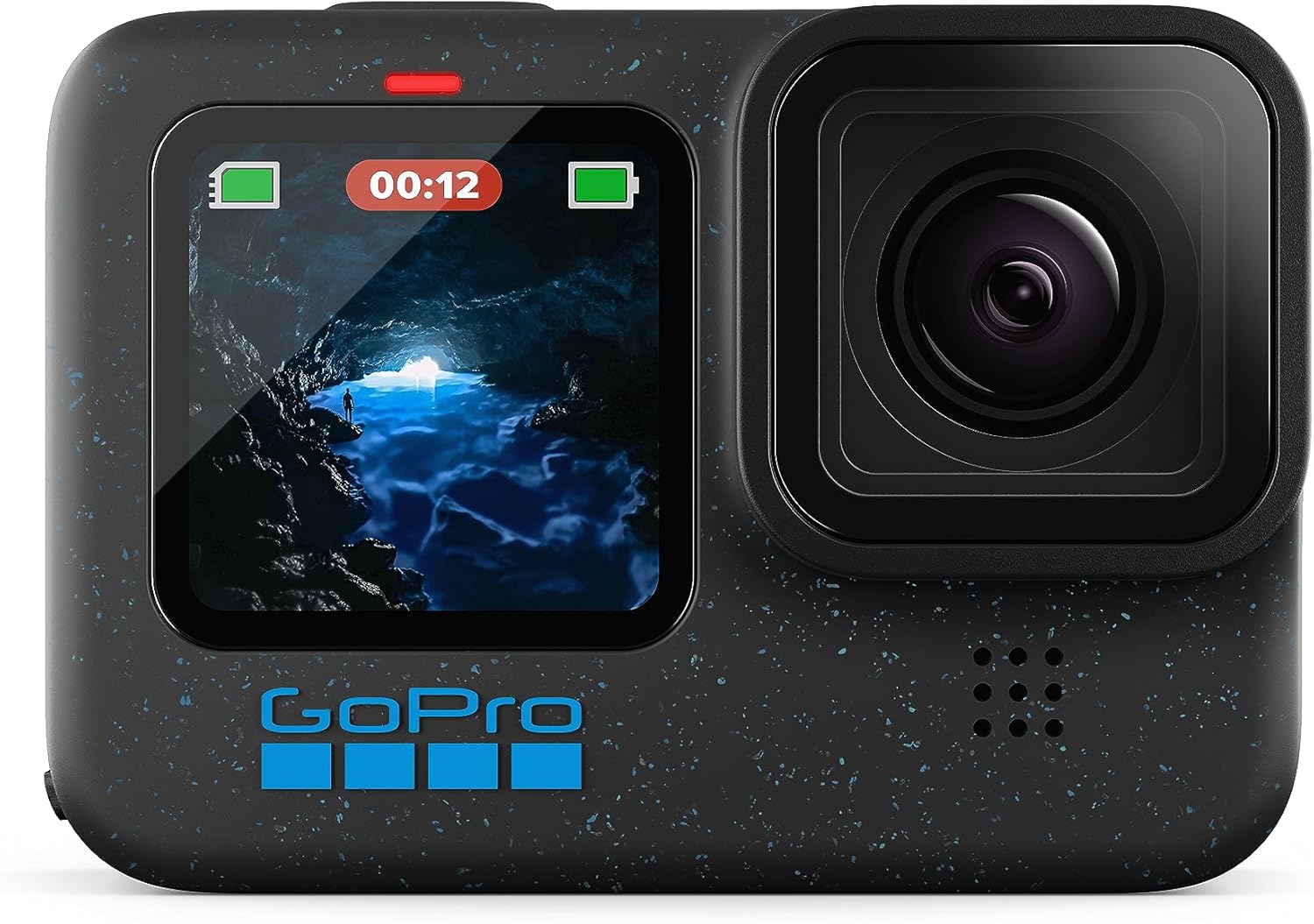
The HERO12 Black is the quiet bargain in the GoPro family. It offers most of what the HERO13 delivers, including excellent stabilization, sharp high-resolution video, and the full accessory ecosystem, and it frequently costs less.
- High-resolution video up to 5.3K
- HyperSmooth stabilization
- Waterproof, rugged body
- Removable high-capacity battery
- Wide mount and accessory support
- Wireless audio support
The case for last year’s flagship
Buying the previous generation of a camera is one of the most dependable ways to save money without losing much. The HERO12 Black is close enough to the HERO13 in terms of surf-relevant features that many surfers will never notice the difference. It shares the same excellent stabilization approach, offers sharp footage in good light, and works with the same mounts and accessories that fill surf shops and online stores.
How it handles real surfing
On a board mount, the HERO12 captures smooth, impactful footage with a wide field of view, which makes small waves look bigger and fast turns feel more dramatic. Chest mounts offer a more personal perspective, and pole mounts give you the chance to film from behind or alongside. Horizon leveling works well and gives your footage a polished, professional feel. In bright conditions the colors are rich and detailed, and the slow-motion options are excellent for dissecting your technique or sharing barrel rides.
It is worth mentioning that the HERO12 benefits from a long production run, which means a large volume of community advice, settings guides, and tutorials is available. If you hit a problem, chances are someone has already solved it and posted about it online. For surfers who like to tinker, that is a real perk.
Limitations to know about
Like other cameras with smaller sensors, the HERO12 does not match the best DJI models in low light, so dawn and dusk footage will show more noise. Battery life is respectable but not class-leading, particularly in cold water. Carry a spare if you plan to stay out for long sessions. Also remember that the camera is waterproof without a case, but you must keep the lens and seals clean and inspect them regularly.
Who should buy it
The HERO12 Black is a great option for surfers who want to be part of the GoPro ecosystem without paying for the newest release. It is also an excellent second camera for filming from different angles, and an appealing choice for anyone upgrading from an older GoPro who wants to keep using existing mounts and accessories.
✅ Pros
- Proven reliability and strong stabilization
- Access to the huge GoPro accessory range
- Often a bargain compared with the newest model
- Lots of community support and tutorials
❌ Cons
- Low-light performance trails large-sensor DJI models
- Battery life can shorten in cold water
- Not the latest hardware
Reliable GoPro quality at a friendlier price.
9. Insta360 X3: Best for Creative and 360-Degree Surf Footage

The Insta360 X3 does something no traditional action camera can: it records everything around it at once. You then choose the angle in editing, which means you will never miss the shot because you pointed the camera the wrong way.
- 360-degree capture with dual lenses
- High-resolution 360 video
- FlowState stabilization
- Invisible selfie stick effect
- Large flip-up touchscreen
- Waterproof body
Why 360 works so well for surfing
Surfing is chaotic and unpredictable. Waves move, friends appear in odd places, and the best moments rarely happen where you expect them. With a 360 camera, you simply record the entire scene and decide later where to point the virtual camera. Mount the X3 on a pole, hold it above the water, and you can reframe in the app to follow a surfer, switch to a wide shot of the lineup, or create dramatic spinning transitions that look like a drone shot.
The famous invisible selfie stick effect is a favorite among surfers who film from a pole. Because the camera sees in every direction, the editing software can remove the pole from the final footage, creating the impression that the camera is floating on its own. The result looks like a drone or a chase camera that never existed. It is an extremely fun way to shoot your own sessions.
Strengths in the water
The X3 is designed for water use and holds up well to dunking, although the large lens bulges on each side demand extra care. Lens guards are widely recommended, and a quick wipe before each session prevents water droplets from distorting your footage. Stabilization is impressive, with the camera smoothing out motion and keeping the horizon level even if you tumble through a wave. A big touchscreen makes setup easy on the beach.
Trade-offs to consider
Editing 360 footage takes more time than editing conventional video, and exports can be large. The effective resolution of a flat clip reframed from 360 footage is lower than a standard 4K clip from a traditional action camera, so if raw sharpness is your top priority, a DJI or GoPro model will give you cleaner footage. Low-light performance is also more limited because of the smaller sensors. These are real compromises, and you should consider them before buying.
Who should buy it
The X3 is perfect for creative shooters, travel surfers who want to capture entire sessions, and anyone who enjoys playing with unconventional angles. It also works well as a second camera alongside a flagship model, giving you a different perspective on the same wave.
✅ Pros
- Capture everything and choose the angle later
- Invisible selfie stick effect looks incredible
- Strong stabilization with horizon leveling
- Big, easy-to-use touchscreen
❌ Cons
- Editing takes more time and storage
- Reframed footage is less sharp than a dedicated 4K camera
- Exposed lenses need careful protection
For surfers who want creative, drone-style footage.
10. Budget Picks: AKASO Brave 7 LE, AKASO EK7000, Hiicam 5K, and AKASO Brave 4
Not everyone wants to spend flagship money on a camera that might spend its life being tossed in saltwater, and that is a perfectly reasonable position. The four cameras below prove that you can start filming your sessions for a fraction of the price. They will not match the image quality or stabilization of the premium models, but they offer remarkable value and plenty of included accessories.
Good to know: Budget cameras often rely on an included waterproof housing rather than a natively waterproof body. Check the seal and latch before every session, and rinse the housing in fresh water afterward.
AKASO Brave 7 LE: best budget pick

The Brave 7 LE is the camera we would recommend to most budget-conscious surfers. It offers 4K video, dual screens for easy framing, stabilization, and multiple included batteries, all in a package designed with beginners in mind. A wrist remote is a handy addition when the camera is mounted on a pole or board and you need to start recording from a distance.
- 4K video with stabilization
- Dual screens
- Two batteries in the box
- Waterproof housing included
- Wireless remote support
In good light, the footage looks sharp and colorful, and stabilization smooths out the worst of the vibration. In low light, noise creeps in and the image softens, which is a common limitation at this price. For casual sessions and social clips, it is more than good enough.
A feature-packed budget camera for beginners.
AKASO EK7000: the cheapest way to start

The EK7000 is a long-running entry-level model that has introduced countless people to action filming. It is simple, inexpensive, and comes with a large collection of mounts and accessories. It is a sensible option if you are curious about filming but unsure how often you will use a camera.
- Simple controls and menus
- Large accessory bundle
- Waterproof housing included
- Rechargeable batteries included
- Wide-angle lens
Understand its limits. Stabilization is basic or absent depending on the version, so footage from a board mount can look shaky. It also struggles in low light. But for bright, calm days or for kids and beginners who just want to capture the fun, it does the job without any fuss.
A low-cost way to try action filming.
Hiicam 5K Action Camera: budget high-resolution

The Hiicam 5K camera markets itself on high-resolution video at a very low price, along with stabilization and a generous bundle of accessories. It is an interesting option for surfers who like big numbers on a spec sheet and want to experiment with cropping and reframing.
- High-resolution headline video modes
- Electronic stabilization
- Waterproof housing included
- Accessory bundle included
- Compact, lightweight body
Treat headline resolution claims with some caution. At this price, higher resolution modes often come with trade-offs in sharpness, frame rate, and battery life, and real-world footage rarely matches what a premium camera produces at a lower nominal resolution. Still, as a first camera or a throwaway option for risky mounts, it can be a fun and affordable choice.
High-resolution specs at a budget price.
AKASO Brave 4: budget all-rounder

The Brave 4 sits comfortably in the middle of the budget range. It provides 4K video, electronic stabilization, a wrist remote, and a robust set of mounts, giving beginners a well-rounded kit without a big investment.
- 4K video with stabilization
- Wrist remote for hands-free control
- Waterproof housing included
- Multiple batteries in the box
- Plenty of mounts and accessories
It is a solid step up from the most basic entry-level cameras, with smoother footage and more flexible controls. Compared with the Brave 7 LE, it is typically a little simpler, so check the current listing to see which one offers better value on the day you shop.
Solid performance and plenty of extras on a budget.
Which budget camera should you pick?
If you want the best overall balance, go for the Brave 7 LE. If you want to spend as little as possible while you figure out whether you enjoy filming, the EK7000 is the easiest entry. If you like high-resolution specs, the Hiicam 5K is worth a look, and the Brave 4 is a dependable middle path. Whichever you choose, you will get more value from it if you pair it with a good mount and a floating handle.
✅ Budget Camera Pros
- Low cost makes it less painful if lost or damaged
- Large accessory bundles included
- Spare batteries often in the box
- Great for beginners and kids
❌ Budget Camera Cons
- Weaker low-light and stabilization performance
- Housing seals add a potential failure point
- Less reliable color and sharpness
Browse current deals on affordable waterproof cameras.
11. Mounts, Leashes, and Floats: Protect Your Camera and Your Footage
A surprising number of action cameras end up on the seafloor, and almost none of them were lost because of a bad camera. They were lost because of a bad mounting setup. The ocean is relentless, and a mount that holds in the shallows can fail in a hard wipeout. Spending a little on the right accessories is the best insurance you can buy for a camera that costs hundreds.
Board mounts
The two classic positions are the nose and the deck. A nose mount gives you a dramatic view of the wave breaking in front of you and your feet planted on the board. A deck mount, usually placed near the tail or the center, captures your whole body and the face of the wave. Adhesive and suction mounts are both popular. Adhesive mounts stay put once they have cured, but they are harder to move. Suction mounts are flexible, but should be tested carefully, because water pressure and board flex can break the seal. Whichever you choose, always add a leash or tether to the board so that the camera cannot sink if the mount fails.
Chest and head mounts
Chest harnesses give you an immersive first-person view and keep the camera closer to your center of gravity, which makes the footage feel more natural. They are also better at keeping the camera attached during wipeouts than a board mount, though they can interfere with paddling if the harness is poorly fitted. Head mounts offer a view that closely matches what you see, but they can lift or twist during duck dives, so test them in small surf first. If you wear a hooded wetsuit in colder conditions, our cold water wetsuit guide can help you find a suit that works with your harness and gloves.
Floating handles and poles
A floating handle is probably the single most useful accessory you can buy. If the camera comes loose, it floats to the surface instead of disappearing. It also lets you hold the camera in the water for filming friends, grab low-angle shots, or capture selfie footage as you paddle. Poles extend your reach and are especially useful with a 360 camera like the Insta360 X3, where the selfie stick disappears in editing. Bright colors help you spot a floating handle in the whitewater.
Tethers, leashes, and safety lines
Whatever mount you use, add a tether. A short leash from the camera to the board or to your wrist is cheap and simple. Magnetic quick-release systems are convenient, but they are not a substitute for a safety line, and neither are adhesive pads. Treat the tether as non-negotiable, particularly for premium cameras. Keep leash lengths short enough that they do not tangle around your legs or the fins, and use quick-release clips so that you can detach the camera in an emergency.
Footwear and gear for the whole kit
If you are filming through the colder months, remember that your own comfort affects your footage. Numb feet and cold hands make it harder to set up gear and stay in the water. Good surfing booties are a surprisingly effective upgrade for winter filming, because comfort keeps you out there longer, and longer sessions mean more footage.
| Mount Type | Best For | Watch Out For |
|---|---|---|
| Nose mount | Dramatic wave views and foot placement | Can be hit during nosedives; always tether |
| Deck mount | Full-body action shots | Can interfere with foot placement on small boards |
| Chest mount | Immersive first-person footage | Harness fit and paddling comfort |
| Head mount | View that matches your eyeline | May shift during duck dives |
| Floating handle | Hand-held shots, safety, selfie angles | Wrist strap should fit snugly |
| Pole | Filming friends and 360 invisible stick effect | Extra drag during paddling |
Matching your mount to your board
Different boards suit different mounting strategies. Shortboards are small and responsive, so a heavy mount near the nose can change how the board feels, and you may prefer a chest mount instead. Longboards have more deck space and are naturally stable, which makes them perfect for deck and nose mounts. Foam boards used by beginners are often rented or shared, so check whether adhesive mounts are allowed before you stick anything to a board that is not yours.
Stand-up paddleboards and bodyboards open up other options, such as handlebar-style pole mounts and wrist floats. Experiment with a few positions on small, safe days so that you know how each one behaves before you rely on it in bigger surf. The goal is a setup you can forget about once you are riding a wave.
Protect your camera with a float and a tether before you paddle out.
12. Best Settings, Filming Tips, and Saltwater Care
Even the best camera in this guide will produce average footage if the settings are wrong or the lens is smeared with salt. This final deep dive covers how to configure your camera, how to shoot better surf clips, and how to keep your gear healthy so it lasts for years.
Recommended starting settings
Start with 4K at 60 frames per second, with stabilization turned on to its standard or high setting. Shooting at 60 frames per second gives you smooth playback and the option to slow clips down by half in editing. If your camera supports a 120 frames per second mode, save it for specific moments like barrels or big turns, because it uses more battery and storage. Set the field of view to wide for board mounts so you capture the surrounding scene, and use a narrower view for chest mounts so that the footage does not look distorted.
Turn on horizon leveling if your camera offers it. It is one of the most beneficial settings for surfing because the board is constantly rolling and tilting. Turn off unnecessary features like screen savers, beeps, and wireless connections to conserve battery. If your camera has a quick-capture mode, use it so that you can start recording with a single press.
Exposure and color
Automatic exposure works well in most conditions, but glare off the water can fool it. If your footage looks too dark or too bright, adjust exposure compensation slightly. A neutral color profile gives you more flexibility in editing, while a standard profile produces ready-to-share footage straight from the camera. If you are new to editing, stay with the standard profile and avoid heavy manual settings until you understand what they do.
Composition tips for better surf footage
Think about what makes a surf clip engaging. The best footage usually includes context, such as the lineup, the shape of the wave, and the surfer’s position on it. A static, centered view is rarely as interesting as one that includes a bit of the horizon and the wave face. Vary your angles across sessions. Try a nose mount one day, a chest mount the next, and a pole the day after. Review your footage to learn what works.
Timing matters as well. Early in the morning, the light is soft and the water is glassy. Late afternoon offers warm, golden tones. Midday sun can look harsh, but it produces vivid colors and clear water. Knowing when the waves will be best also helps, and understanding what tide is best for surfing will help you choose the right moment to film your sessions.
Dealing with fog and water droplets
Foggy lenses ruin footage, and they usually happen when the camera moves from a warm environment into cold water. Anti-fog inserts placed inside the housing or door can help. Keep the camera in the shade before the session, and avoid leaving it in a hot car. Water droplets on the lens can also distort your footage. Before each takeoff, you can dip the camera briefly into the water so that droplets sheet off the lens rather than clinging to it. A touch of lens-safe hydrophobic treatment can reduce beading as well.
Saltwater care and maintenance
Salt is the real enemy of action cameras. After every session, rinse the camera in fresh water for a minute or two, with the door closed. Gently work the buttons under the water to flush out salt crystals. Then dry the camera with a soft towel and leave it open to air dry before storing it. Never let a camera dry with salt on it, because crystals can scratch seals and corrode contacts.
Inspect the door seal before every session. Look for sand, hair, or cracks in the gasket, and clean it gently with a lint-free cloth. Replace seals on a regular schedule if the manufacturer recommends it. Use the bundled lens cover or a protective filter to guard against scratches, and replace it if it gets damaged. Store batteries separately in a cool, dry place, and avoid charging them immediately after a hot or cold session. Allow them to reach room temperature first.
Storage and workflow
High-resolution footage uses a lot of storage, so invest in a reliable high-speed memory card with plenty of capacity. Copy your footage to a computer or cloud service after every few sessions, and keep a second backup if the footage matters to you. Label clips by date and location to save time later. If you plan to share clips on social media, trim them down and select only the best seconds. Short, punchy clips with good music generally perform better than long, unedited sessions.
If you are brand new to the sport and want to know what to wear while filming, our guides on what to wear surfing and what to wear under a wetsuit cover the basics, and they pair well with a camera setup that does not interfere with your movement.
Pro tip: Keep a small pouch with a microfiber cloth, a spare battery, and a few anti-fog inserts in your beach bag. These small items save a lot of sessions.
Editing and sharing your clips
A good surf edit is shorter than you think. Choose the best few seconds of each wave, trim the paddling and the waiting, and let the strongest moments carry the video. Use slow motion sparingly, on the best turn or the most dramatic section of a barrel, so that it feels special rather than routine. Most cameras ship with a companion app that can assemble quick edits automatically, and these are a great way to produce something shareable in minutes.
If you want to go further, desktop editing software gives you more control over color, stabilization, and sound. Adjusting contrast and warmth slightly can make the water look more natural, and a little extra sharpening can help if you reframed the clip. Always keep your original files, so you can return and re-edit them later as your skills improve.
Filming etiquette in the lineup
Filming is fun, but it should never get in the way of safety or courtesy. Do not paddle into a wave just to get a better shot, and do not hold a pole in a way that could hit another surfer. If you are filming friends from the water, stay out of the takeoff zone and give surfers plenty of room. Be aware that not everyone wants to appear in your video, so be thoughtful about who you point the camera at, and ask before posting footage that features other people. Respecting the lineup keeps the vibe good and keeps everyone safe.
Small accessories that protect your footage and your camera.
Frequently Asked Questions About Action Cameras for Surfing
What is the best action camera for surfing overall?
For most surfers who want the best footage, the DJI Osmo Action 6 Enhanced Combo is our top pick. It offers excellent low-light performance, outstanding stabilization, and a rugged waterproof body. If you want a more affordable flagship, the Osmo Action 5 Pro is a smart alternative.
Is a GoPro or a DJI better for surfing?
Both are excellent. DJI tends to win in low light thanks to its larger sensors, while GoPro offers the biggest ecosystem of mounts and accessories. If you shoot at dawn or dusk, lean toward DJI. If you value accessory choice and community support, lean toward GoPro.
Do I need a waterproof case for surfing?
It depends on the camera. The DJI, GoPro, and Insta360 models in this guide are designed to be waterproof without a case. The budget AKASO and Hiicam models typically rely on an included waterproof housing, so inspect the seals carefully before each session.
How do I stop my action camera from sinking?
Use a floating handle or a floating strap, and add a tether between the camera and your board or wrist. Magnetic mounts and adhesive pads can fail in a hard wipeout, so a safety line is essential.
What is the best place to mount a camera on a surfboard?
The nose and deck are the most popular positions. A nose mount gives a dramatic view of the wave, while a deck mount captures your whole body. Chest mounts and floating handles are great alternatives for different perspectives.
What resolution and frame rate should I use for surfing?
For most people, 4K at 60 frames per second is the best balance of quality, file size, and battery life. Use 120 frames per second occasionally for slow motion on special moments.
How long does an action camera battery last during a surf session?
It varies by model, resolution, and temperature. Premium cameras often last long enough for a full session, while budget models may need a spare battery. Cold water reduces battery life, so always bring a backup if you plan to stay out for a long time.
Are 360 cameras good for surfing?
Yes, for creative shooters. A 360 camera like the Insta360 X3 lets you capture everything and choose your angle later, and its invisible selfie stick effect creates drone-style footage. The trade-off is more editing work and lower sharpness than a dedicated action camera.
Can a budget action camera handle surfing?
Yes, as long as you set realistic expectations. Budget cameras like the AKASO Brave 7 LE and Brave 4 produce decent footage in good light, but they struggle in low light and may have weaker stabilization. They are great for beginners and casual sessions.
How do I prevent my lens from fogging up?
Use anti-fog inserts, keep the camera out of hot cars, and avoid sudden temperature changes before entering the water. Dipping the camera briefly in the water before a session can also help equalize temperature.
How should I clean my action camera after surfing?
Rinse it in fresh water with the door closed, work the buttons under the water to remove salt, dry it with a soft cloth, and let it air dry fully before storing. Inspect the seals regularly for sand or damage.
Is it worth buying the previous-generation camera?
Often, yes. Models like the Osmo Action 4, Osmo Action 5 Pro, and HERO12 Black deliver most of what the newest cameras offer at a lower price. For many surfers, the savings are worth more than the small performance gap.
Browse the top-rated surf-friendly action cameras on Amazon.
Final Verdict: Which Action Camera Should You Buy for Surfing?
The right surf camera is the one that matches how you surf, how you film, and how much you want to spend. If you simply want the best footage and have the budget, the DJI Osmo Action 6 Enhanced Combo is the camera to get. It delivers beautiful low-light images, excellent stabilization, and a body that is ready for the surf. If you want something nearly as good for less, the Osmo Action 5 Pro and the Osmo Action 4 are outstanding values.
For surfers who care about mounts, accessories, and community support, the GoPro HERO13 Black and HERO12 Black remain superb choices. If you are creative and want to experiment with unusual angles, the Insta360 X3 opens up possibilities that other cameras cannot match. And if you are watching your budget, the AKASO Brave 7 LE, Brave 4, EK7000, and Hiicam 5K offer an accessible way to get started.
Whatever camera you choose, remember that the best footage comes from a secure mount, a clean lens, a charged battery, and a willingness to paddle out and keep trying. Protect your gear with a float and a tether, rinse it after every session, and review your clips to improve your surfing. The waves will do the rest.
The best all-around camera for capturing your next session.